


Fluently - AI English Tutor
4.987.00 Reviews
App Specs
- Version
- 39
- Updated On
- License
- Free
- Downloads
- 100,000+
- Developer
- Fluently
- Categories
- Education
- Platform
- Android
Screenshots
 Analysis by AppCompare
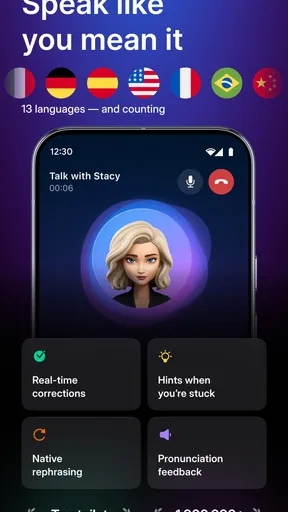
I’d approach Fluently - AI English Tutor with one practical goal in mind: getting more comfortable speaking English when there isn’t a patient conversation partner nearby. That is a different need from memorizing vocabulary or completing a grammar worksheet. This education app, made by Fluently, centers practice on spoken exchanges and AI corrections, so its clearest use is turning a spare moment into a low-pressure chance to express an idea out loud.
That focus is appealing if you understand English well enough to follow a conversation but hesitate when it is your turn to speak. I see the main value less as a shortcut to fluency and more as a way to rehearse, notice recurring mistakes, and try a sentence again without worrying about holding up another person. It can help make speaking practice easier to fit into a routine, though it cannot replace every kind of instruction or the give-and-take of a real human conversation.
What the speaking-first approach changes
Many language-learning apps are strongest at structured exercises: matching words, choosing a verb form, or reviewing flashcards. Those activities can build useful knowledge, but recognizing a correct answer is not the same as producing one while speaking. Fluently’s conversation-based approach targets that gap. I would use it to practise turning a thought into a spoken response, then pay attention to the correction rather than treating each exchange as a score to chase.
That distinction matters for learners who can read a message or understand a lesson but freeze in a meeting, on a call, or while travelling. Speaking to an AI can be a gentler first step because there is less social pressure than asking a colleague to correct every sentence. The trade-off is that an AI exchange is still practice, not a full substitute for real people, where interruptions, different accents, shared context, and unexpected reactions all affect how communication feels.
Getting Started with Fluently
First things first, getting started with Fluently - AI English Tutor is a breeze. After downloading and installing the app, you're greeted with a sleek and intuitive interface. It’s designed in a way that even if you’re not tech-savvy, you won’t feel overwhelmed. The onboarding process guides you through setting up your learning preferences, and voila, you’re ready to dive into the world of English.
Interactive Learning Experience
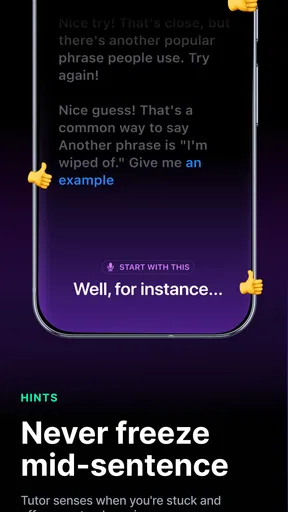
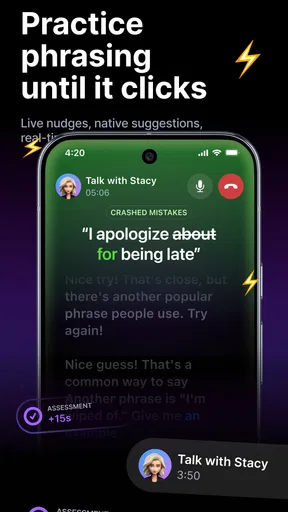
One of the standout features is the interactive lessons. You’re not just passively reading or listening; Fluently engages you in conversation. The AI tutor is surprisingly human-like in its interactions. It corrects your mistakes, offers suggestions, and even throws in some idioms to make you sound more like a native speaker. It's like chatting with a friendly language coach who’s always on standby.
Make corrections useful after the conversation
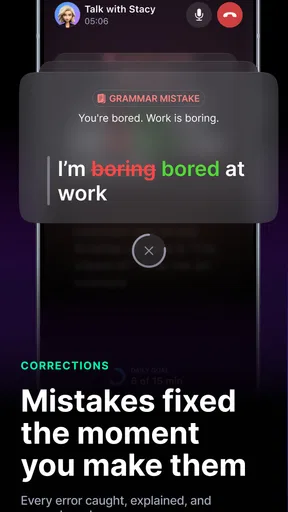
Instant feedback is easiest to benefit from when I turn it into a small follow-up task. Rather than racing straight into another exchange, I would pause after a correction and say the improved sentence again, then make a fresh sentence using the same pattern. That second attempt helps reveal whether I understood the change or merely accepted a suggested rewrite. If the correction changes the meaning I intended, I would keep my original idea in mind and try a clearer version instead of copying wording blindly.
Worth Reading Before You Choose

EA SPORTS FC Mobile 26 Is a Bigger Football Game, but It Takes Time

Flipboard Shows What News Apps Must Do Beyond the Feed

Switching to Android Auto Means Rethinking Your Driving Routine

Google Calendar Makes a Crowded Week Easier to Manage

Ludo King Makes the Most of the Minutes Between Plans

Baby Panda World Brings Quick Play to Modern Phones, but Its Game Library Feels Busy
A short practice session can also feed into a real task later in the day. Before a work call, for instance, I might rehearse how to explain a delay, ask for clarification, or disagree politely. After practising, I can carry one or two phrases into the call and notice which ones feel natural. This is a more useful measure of progress than simply completing a session: the goal is to make a real exchange easier, not to collect app activity.
Tailored Lessons Just for You
Another aspect I really appreciated is the personalized learning experience. From the get-go, Fluently asks about your proficiency level and learning goals. Whether you're prepping for a TOEFL exam or just trying to get better at business English, the app tailors lessons to suit your needs. And it’s not a one-size-fits-all approach, which is crucial for effective learning.
Personalization is most helpful when I treat a stated goal as a starting point, not a guarantee that every practice turn will match my exact situation. A learner preparing for a speaking-heavy task may want to focus on clear explanations and follow-up questions, while someone improving workplace English could rehearse introductions or concise updates. I would pick one concrete situation for a session, then judge whether the practice gave me language I could actually reuse. That keeps the app’s broader tutoring experience connected to a specific need.
Engaging and Varied Content
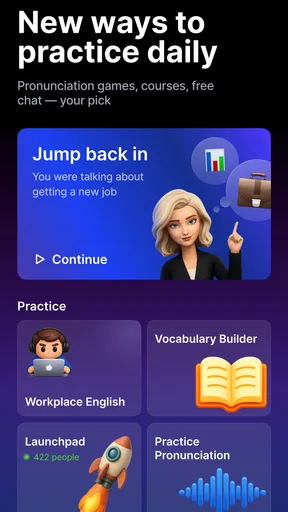
The app offers a rich array of content to keep things fresh and interesting. You’ve got everything from grammar exercises and vocabulary drills to listening comprehension tasks. Plus, the app’s library is regularly updated with new content, so you’re always learning something new. I found the audio clips particularly helpful, especially when you can slow them down to catch every word.
Fit practice into an ordinary day
A realistic routine does not need a long, formal study block. I might practise during a quiet break, choose a topic related to an upcoming conversation, and stop once I have worked through a useful exchange. If I am tired or in a place where speaking aloud would be awkward, a listening or vocabulary task may be a better fit than forcing a spoken session. The point is to choose the kind of practice that suits the moment, rather than assuming every spare minute should become a lesson.
For listening work, slowing down an audio clip can help me catch a phrase I missed, but I would return to a normal pace afterward. Understanding slowed speech alone can create a false sense of readiness if the real conversation will move faster. I would use the slower playback to identify sounds or word boundaries, then listen again at the usual speed and try to summarize what I heard. That small handoff from careful listening to ordinary pace makes the exercise more practical.
Real-Time Feedback and Progress Tracking
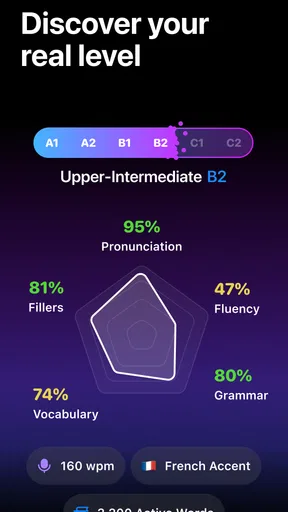
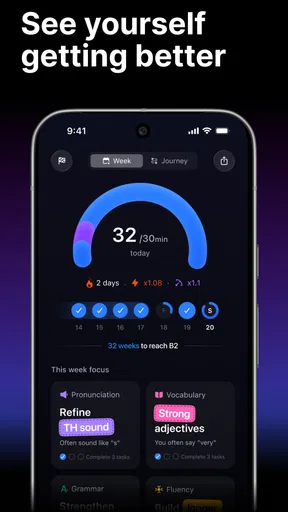
Feedback is instant and constructive. After each exercise, you get a detailed analysis of your performance. It’s not just about pointing out mistakes; the app explains why something is incorrect and how to fix it. Plus, the progress tracker keeps you motivated by showing how far you’ve come. It’s incredibly satisfying to see those bars inch closer to your goals.
Corrections are most valuable when I look for patterns across attempts rather than treating each one as an isolated verdict. If I keep receiving feedback on the same kind of sentence, that is a cue to practise that structure again in a different context. At the same time, no automated correction should be followed mechanically if it makes a response sound less like what I meant. I would use the explanation to understand the choice, then decide how to express the thought clearly in my own words.
The progress display can encourage consistency, but visible movement is not the same as being ready for every conversation. I would pair it with a simple real-world check: can I explain my plans, ask someone to repeat a point, or describe a problem without switching languages? Those small outcomes are more meaningful than a tracker by itself. If progress feels slow, changing the practice situation or revisiting a recurring correction may be more useful than simply adding more time.
Who benefits most, and who may prefer another route
I think Fluently is a particularly good fit for learners who already know some English and want regular speaking practice without having to schedule another person. It also suits people who learn by trying a sentence, receiving feedback, and trying again. A student who wants extra rehearsal alongside classes, or a professional who needs to feel less hesitant before routine calls, can use that format to bridge the gap between studying and speaking.
It is less suitable as a sole resource for someone who needs a teacher to explain a difficult topic in depth, a structured course with a clearly defined syllabus, or feedback from a human listener who can interpret nuance and context. It may also be a poor fit if you cannot comfortably speak aloud where you usually study, or if you mainly want silent reading practice. In those cases, a textbook, classroom, human tutor, or self-paced reading resource may address the need more directly; Fluently can still be supplementary, but it should not be expected to do every job.
The app is free to download, with in-app purchases ranging from $9.99 to $179.99 per item. I would explore whether its speaking workflow suits me before spending money, and check the purchase details in the app before choosing anything. The average rating is 4.9 from around 15,000 ratings, and it has over 100,000 installs, which suggests that many people have tried it, but those figures cannot tell me whether its approach matches my own learning habits. It is rated for Everyone, runs on Android 7.0 or later, and its current version is 39.
Community and Social Features
Learning a language can sometimes feel like a solitary endeavor, but Fluently has a community feature where you can connect with other learners. You can share tips, practice together, or even compete in challenges. It adds a social element that makes the learning process more engaging and fun.
For me, the useful question is how to balance solo rehearsal with contact that feels less predictable. A community can make practice feel shared, while an AI exchange offers a convenient place to test a phrase before using it with another learner. I would treat those as different kinds of practice rather than expecting either one to cover everything: rehearsing privately can build confidence, and a conversation with another person can show whether I can respond naturally when the other speaker takes the discussion somewhere unexpected.
Where the routine can stumble
The biggest practical friction is that speaking practice depends on having a suitable moment. A busy room, a commute, or a workplace where talking to a phone feels uncomfortable can make an otherwise convenient tutor hard to use. I would plan a short, quieter window rather than repeatedly opening the app in situations where I cannot concentrate. If speaking is not possible, switching to a listening or vocabulary activity can preserve the habit without pretending that silent work gives the same speaking practice.
Another trade-off is the temptation to rely on instant correction as if every polished sentence were automatically the best sentence for the situation. A correct phrase can still sound too formal, too long, or unlike the point I meant to make. I would compare the suggestion with my intended meaning, repeat it aloud, and simplify it when that helps me communicate. This keeps feedback useful while leaving room for judgment, which matters in real conversation.
There is also a difference between practising a familiar prompt and handling a genuinely unfamiliar exchange. Rehearsal can make common situations feel easier, but real conversations may bring unclear questions, changing topics, or people who speak in ways I have not practised. I would use the app to build a stronger starting point, then seek chances to speak with people when possible. That combination is more realistic than expecting any one app to remove every hesitation.
Final Thoughts
Overall, Fluently - AI English Tutor is a comprehensive tool for anyone serious about improving their English. It’s packed with features that cater to different learning styles and preferences. Whether you’re a beginner or an advanced learner, there’s something here for everyone. The app manages to make learning English less daunting and more like an exciting journey.
If you’re ready to level up your English skills, I’d say give Fluently a try. It’s like having a personal tutor that fits right in your pocket, ready to help you master English whenever and wherever you want. Happy learning!
Pros
- Easy-to-navigate interface for all users.
- Offers real-time corrections and feedback.
- Wide variety of learning exercises available.
- Voice recognition enhances speaking skills.
- Progress tracking helps visualize improvements.
Cons
- Requires stable internet connection to function.
- Free version has limited features available.
- Occasional glitches may disrupt lessons.
- No offline mode for practice without Wi-Fi.
- Some advanced features are paywalled.
FAQs for Fluently - AI English Tutor
What is Fluently - AI English Tutor and how does it work?
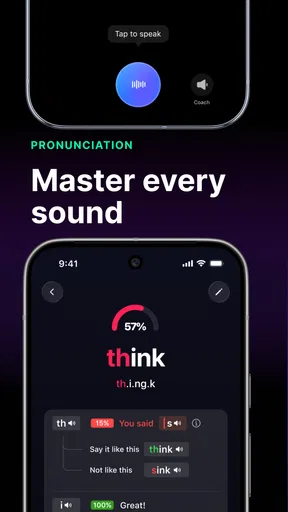
Fluently - AI English Tutor is an innovative app designed to help users improve their English language skills through interactive and personalized lessons. The app uses artificial intelligence to adapt to your learning pace and style, offering exercises in grammar, vocabulary, and pronunciation. It provides real-time feedback to help users learn more effectively.
Is Fluently suitable for all levels of English learners?
Yes, Fluently caters to a wide range of learners, from beginners to advanced speakers. The app assesses your current level through an initial test and tailors its lessons to match your skills. This personalized approach ensures that users receive the appropriate level of challenge and support to enhance their learning experience.
Does Fluently require an internet connection to function?
Fluently primarily operates online, as it needs an internet connection to access its AI capabilities and updated content. However, the app does offer some offline features, allowing users to download lessons and practice materials for use when they are not connected to the internet, providing flexibility in learning.
Are there any subscription fees or in-app purchases in Fluently?
Fluently offers a freemium model, where users can access basic features at no cost. For those seeking more advanced lessons and features, there are subscription options available. These subscriptions provide access to a broader range of exercises, in-depth lessons, and personalized feedback, ensuring a comprehensive learning experience.
How does Fluently ensure the privacy and security of user data?
Fluently is committed to protecting user data by implementing robust security measures. The app uses encryption to safeguard personal information and follows strict privacy policies to ensure data is not shared with third parties without consent. Users can learn more about these measures in the app’s privacy policy section.


